
An error in SAP or eDocSuite?
How the AI assistant helps
A standard SAP process stops or eDocSuite reports an error? The question quickly becomes what went wrong and how to proceed. The AI assistant in eDocSuite explains the error message in clear language, identifies the affected place and suggests concrete steps to resolve it. We show what this looks like in practice using an incoming invoice that cannot be posted in SAP.
A problem every accounts payable team knows
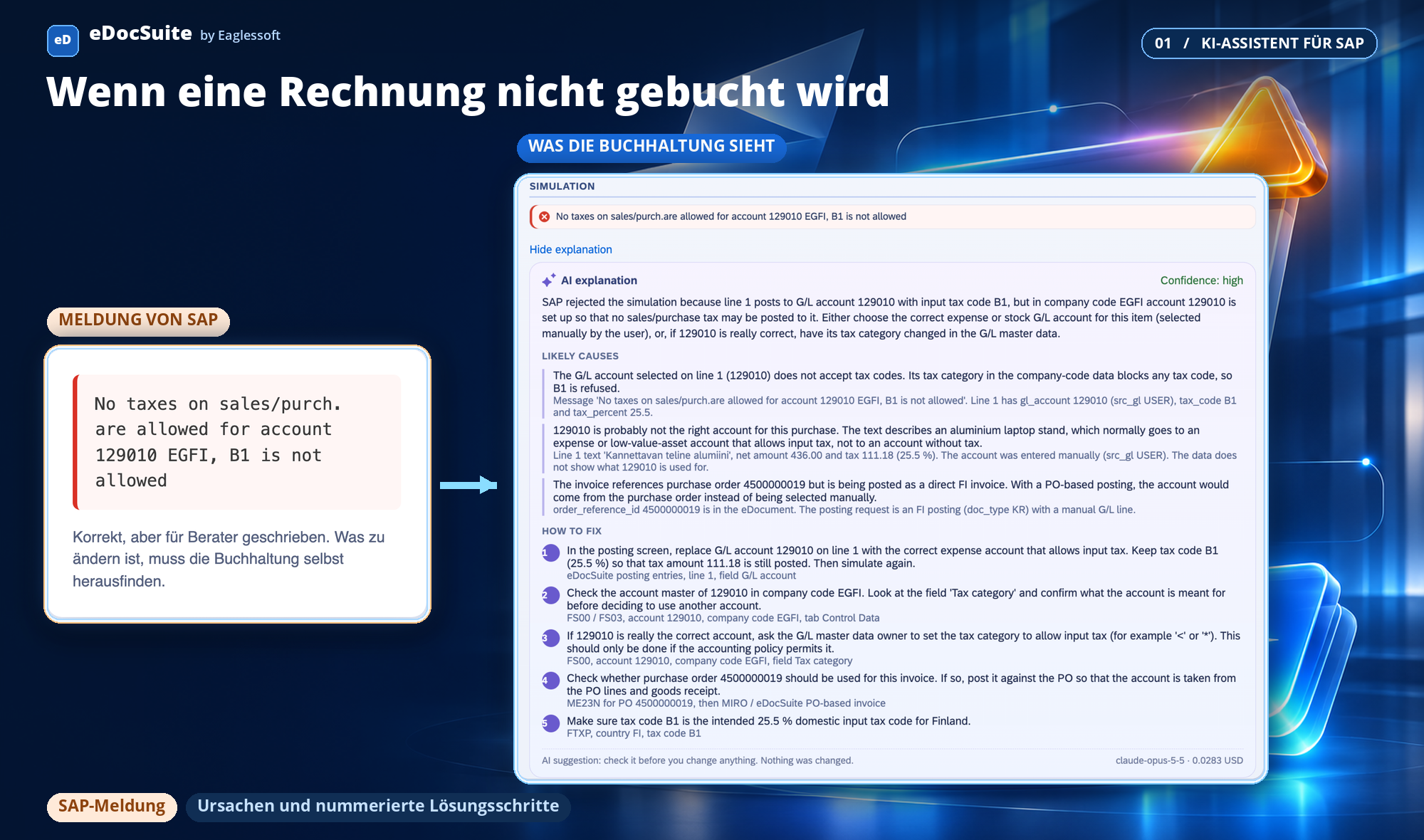
SAP rejects a posting with a message written for consultants, not accountants: “No taxes on sales/purch. are allowed for account 129010”, “Vendor 100018 is not defined in company code”, “You may only enter amounts up to 1,000,000,000.00”.
The accountant knows something is wrong, but not what to change. The invoice remains pending, a ticket goes to the SAP team, and someone checks the G/L account, vendor master or purchase order. As e-invoicing mandates expand, more invoices arrive electronically — and more get stuck at exactly this point.
What accounting sees
The button appears directly below the error, and only when the assistant is enabled for that step. The response always follows the same structure: a two-sentence summary, possible causes with supporting reasons, numbered resolution steps specifying where to perform them, and a confidence assessment.
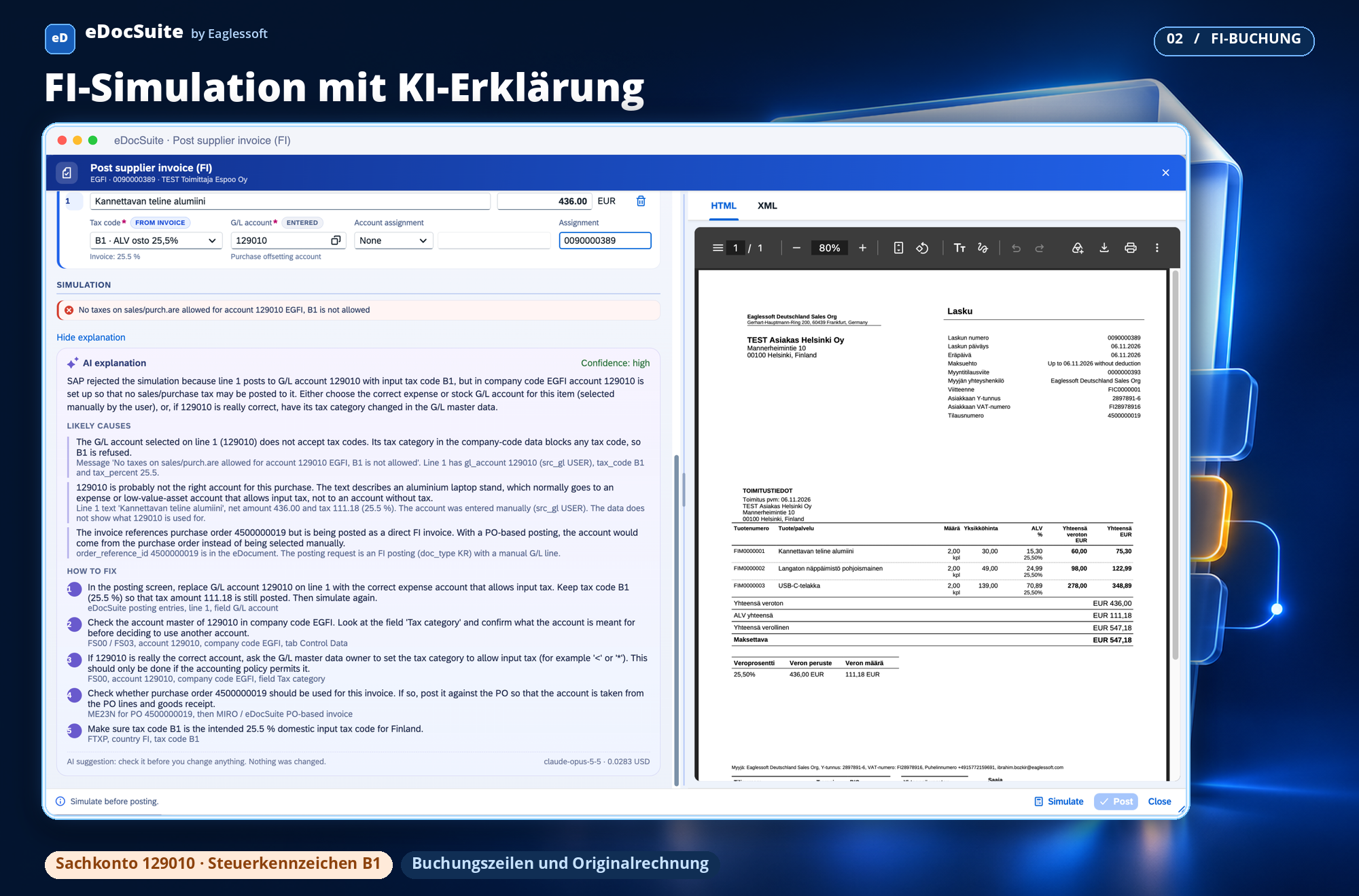
FI posting (invoice without a purchase order). The assistant reads the posting lines sent to SAP during simulation. It traces the error to the combination of G/L account 129010 and tax code B1 on line 1, recognises that the item is a laptop stand, suggests an expense account and notices that the invoice contains a purchase order number.
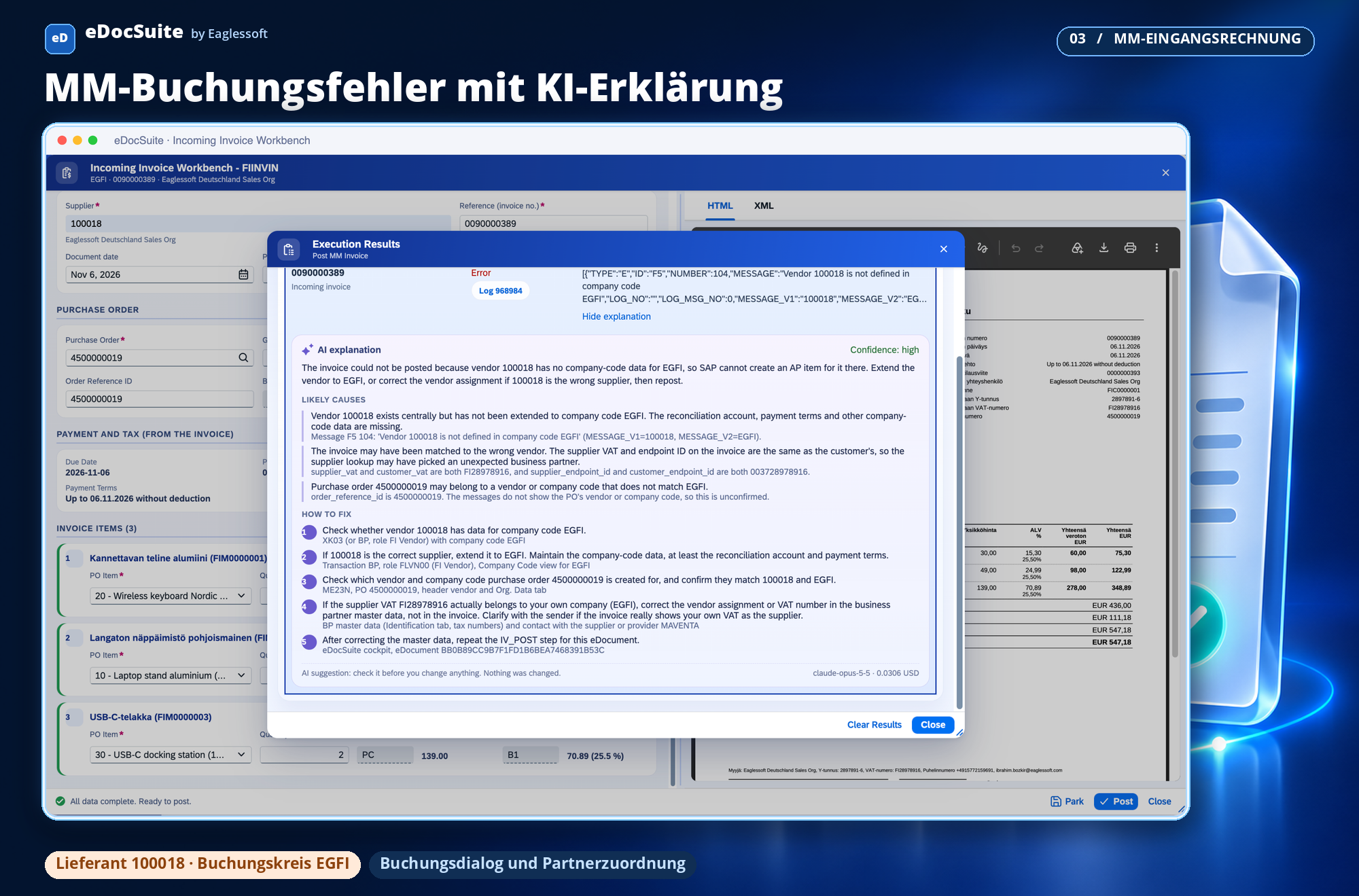
MM incoming invoice. For the message “Vendor is not defined in company code”, the assistant explains that the vendor must be created for the company code. It also detects that the supplier and recipient on the invoice have the same tax number — an indication of an incorrect partner assignment.
| SAP message | What the assistant finds | What accounting does |
|---|---|---|
| Tax code B1 is not allowed for account 129010 | Line 1 posts to an account without tax; the invoice contains a purchase order number | Selects the correct expense account or posts against the purchase order |
| Vendor is not created in the company code | Vendor has not been extended to the company code; supplier and recipient have the same tax number | Extends the vendor or checks the partner assignment |
| Amount exceeds the limit of 1,000,000,000 | Quantity or price unit differs from the purchase order; item data is missing, so confidence is “low” | Checks the purchase order price unit and asks an expert if needed |
When the data does not support a reliable conclusion, the assistant does not guess. It states this openly and recommends: “Ask an SAP expert.”
How it works
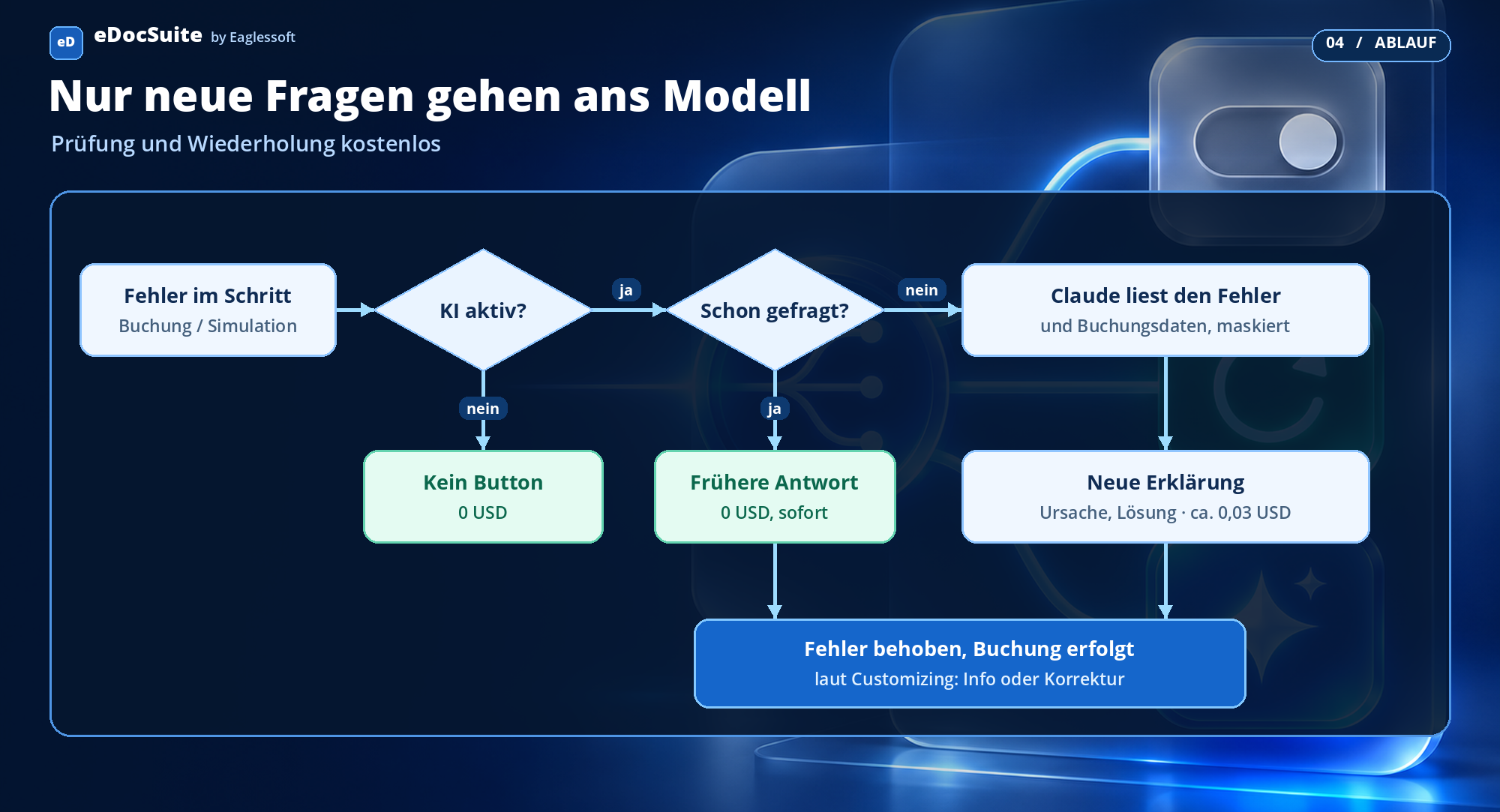
How a posting error becomes an explanation
Before the button appears, a free check runs: Is the assistant active? Is it enabled for this user and this step? Are the budget and daily limit still within bounds? Only a question that has not already been answered is sent to the model.
An assistant you shape through Customizing
The assistant’s behaviour is not fixed; each company adapts it to its own processes. Four settings make the difference.
1. Provide information only or correct directly. In standard mode, the assistant explains and makes suggestions; the decision and posting remain with the user. If desired, a correction mode can be enabled through Customizing: the assistant then applies the proposed correction itself, for example the correct expense account or tax code. You decide which mode applies to each step and company code.
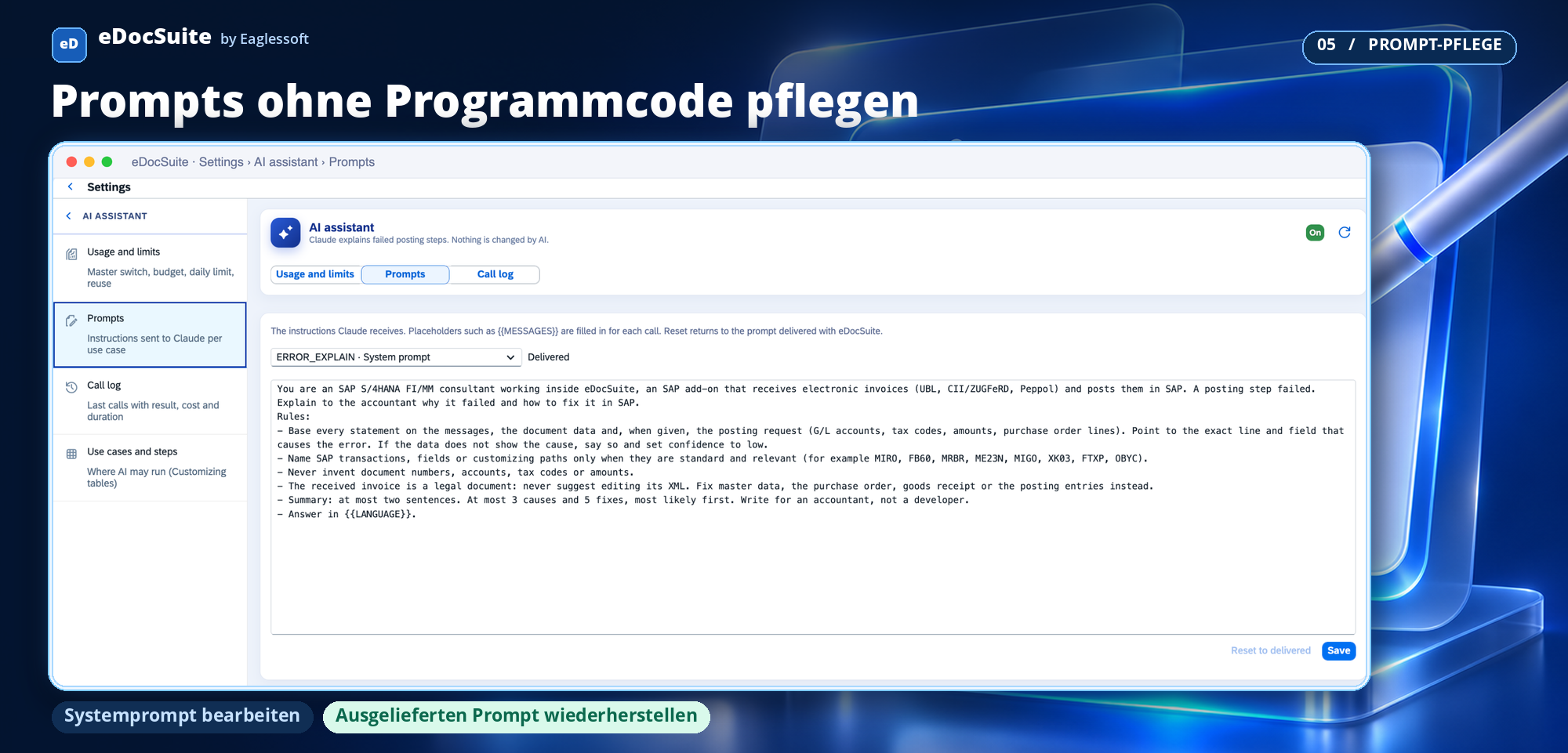
2. Prompts are created and maintained on screen. The instructions and suggestion rules for the model can be read and changed in the settings. You can add your own prompts for your chart of accounts, internal rules or frequent errors; one click returns you to the delivered text.
3. Every process step, not just FI and MM posting. The assistant is not tied to a specific step. Today it is active for posting and simulation; an additional Customizing row makes it available in any other step, such as sending, status queries, purchase order assignment or partner determination. Each row applies by company code, process and step; the most specific row wins, and the model and limits are inherited from the general row.
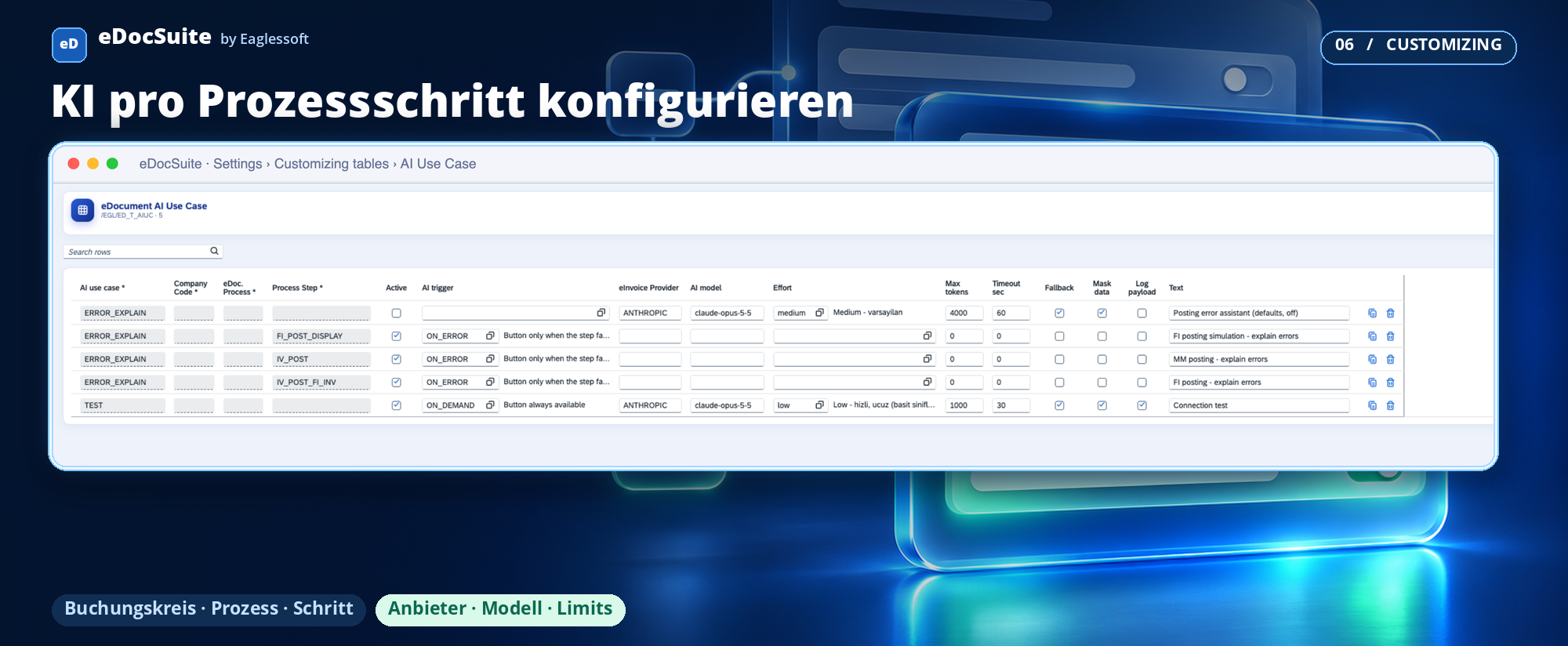
4. Not just Claude: the provider is also Customizing. The assistant is not tied to a particular AI provider. Whether Claude, Azure OpenAI, Google Gemini, SAP Generative AI Hub or another provider — the selection is made in the existing Connections screen and the AI Customizing row: provider, model and connection are defined with just a few fields. Changing providers leaves screens, prompts, limits and logs unchanged. The selection can also be made per step, for example one provider for posting errors and a less expensive model for another step.
You remain in control
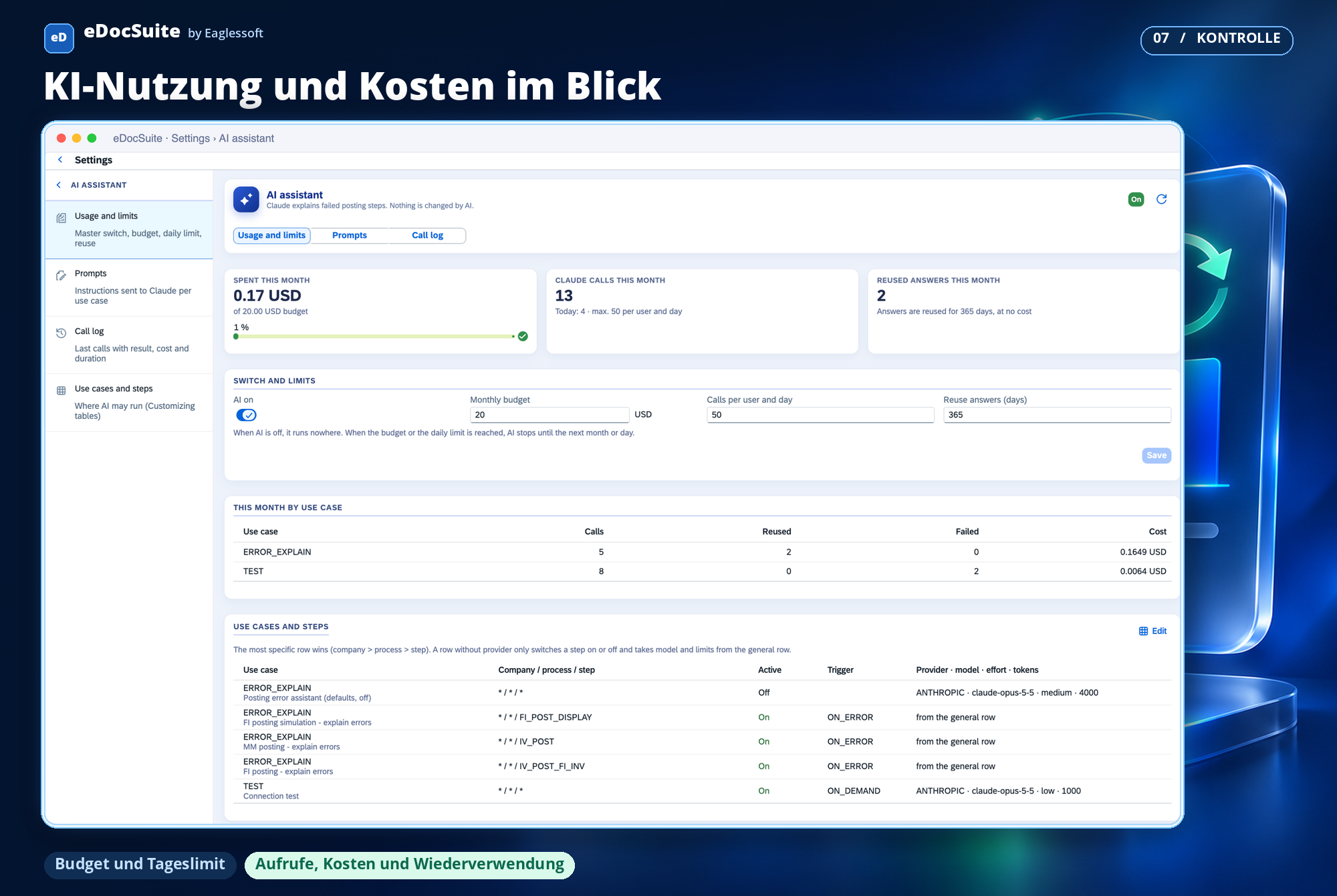
A single settings screen controls where the assistant works, for whom and at what cost. It also shows spending, the number of calls and reused answers.
- Master switch: When it is off, the assistant does not run anywhere and the buttons disappear.
- Monthly budget and daily limit per user: If either is reached, the assistant pauses until the next month or day respectively.
- Activation by step and company code: Start small and expand as needed.
- Role-based authorisation: Only users with AI authorisation see the button; only authorised people change the settings.
- Call log: Every call is logged with user, document, step, result, duration and estimated cost.
Costs: a few cents, easy to plan
An explanation uses an average of around 1,800 input and 1,250 output tokens. At the list price of Claude Opus 5.5 (USD 4 for input and USD 20 for output per million tokens), this is approximately USD 0.032 per explanation:
- Input: 1,800 × 4 / 1,000,000 = USD 0.0072
- Output: 1,250 × 20 / 1,000,000 = USD 0.0250
If the same question is asked again for the same document with the same data, the answer is returned immediately and free of charge from the log. This happens when the same error is simulated several times or another user opens the same invoice. The following table assumes a reuse rate of 40%.
| Explanations per month | Tokens (input / output) | Without reuse | With 40% reuse | Estimated savings |
|---|---|---|---|---|
| 200 | 0.36 million / 0.25 million | USD 6.40 | USD 3.84 | USD 2.56 |
| 1,000 | 1.8 million / 1.25 million | USD 32.00 | USD 19.20 | USD 12.80 |
| 5,000 | 9 million / 6.25 million | USD 160.00 | USD 96.00 | USD 64.00 |
The figures are estimates: actual token usage depends on the complexity of the error and the data sent; the AI provider issues the invoice. A lower reasoning effort or a smaller model is also just a Customizing row and reduces costs further. If the assistant is switched off, the limit is reached or authorisation is missing, the model is not called at all — so no costs arise.
Built securely
- The legal document remains unchanged. The rules sent with every request prohibit changes to the XML of the incoming invoice; corrections concern master data, the purchase order, goods receipt or posting lines.
- Less data leaves the system. Email addresses, IBANs and telephone numbers are masked before they leave SAP.
- Every call is logged. Who asked, for which document, with which model, how many tokens and how long it took; request and response content is stored only if you enable it.
- Keys are stored encrypted in SAP; they appear neither in code nor in the log.
- No provider lock-in. Changing providers or moving to a company-approved platform (for example SAP’s own AI platform) is done through Customizing; the process and screens remain the same.
Your benefits
- Resolve pending invoices faster: The cause and solution arrive within seconds as soon as the error appears.
- Fewer tickets for simple errors: Accounting resolves master data and account issues without waiting for the SAP team; with correction mode active, one click is enough.
- The same quality in every language: The explanation is delivered in the user’s language; the team in Bratislava receives the same help as the team in Frankfurt.
- Predictable costs: A few cents per explanation, free repeat answers and a fixed monthly ceiling.
- Free choice of provider: Start with Claude; moving to a company-approved or less expensive provider is a Customizing task, not a new project.
- No new platform: The assistant sits in the cockpit your team already uses — right next to the error it explains.
Posting errors were the first use case. Building on the same foundation, the next steps are suggestions for G/L accounts and tax codes for invoices without a purchase order, as well as a risk check before posting.
#eDocSuite #SAP #KIAssistent #Fehleranalyse #Prozessautomatisierung #ERechnung #Rechnungseingang #SAPFI #SAPMM